
This is primarily a website about writing and editing, not technology or financial software. However, today I’m writing the post I wish someone else had written for me to read a few weeks ago, in hopes it helps others working with nonprofits.
Quick disclaimer: None of this constitutes legal or financial advice, and I am not a legal or financial professional or advisor. I want to share some information, but the decisions and process at your organization will be unique to your needs. I will say “in my experience” often because I can’t guarantee it’ll all work the same for you.
If you’re here, you probably found this post by searching for information about the very generous discount that Intuit offers nonprofits for a Quickbooks Online Plus subscription through TechSoup. It looks like an excellent savings, at a time when nonprofit funds are stretched thing. But is there a catch? You want to be sure before paying the non-refundable $80 or $170 admin fee that TechSoup charges.
The answer, from my recent experience: getting your new QuickBooks TechSoup Subscription account set up will cost you more time than money. However, it might cost you more money if you want to save time.
In particular, it’ll take you an unexpected amount of time if you already have a QuickBooks subscription and account. If your organization has never used QuickBooks before, so you’re already planning to set up a new account and have scheduled time to do that (give yourself at least a full day, even if your organization is small), you don’t have to worry as much. It’ll be work, but you’re prepared for that.
If, like me, your organization has an existing QuickBooks subscription, you’re going to have to create a copy of what QuickBooks calls your “company” – i.e., your organization’s information, from your name and EIN to your bank account information and past transactions.
This is because a QuickBooks account that receives the TechSoup discount is a different kind of account than one with an ordinary subscription. You can’t just apply the TechSoup discount to your organization’s existing subscription/company/account (whatever one might call it). You’ll need to create a new company in QuickBooks and copy over your information.

The way QuickBooks recommends you duplicate the information is by increasing your existing subscription level, for your current/old account, to QuickBooks Online Advanced. (If you already have Advanced, you’re ahead of the game here, but it’s pretty expensive for many nonprofits’ shoestring budgets.) This upgrade unlocks the ability to back up your old company and copy its information over to the new TechSoup-subscription company.
Once you get the discount, you’ll receive an email confirming Intuit’s donation to your organization and providing step by step instructions for when and how to make the copy. Follow those instructions exactly. It’s straightforward enough, with two big caveats:
- You’ll want to do this quickly and then downgrade or cancel your QuickBooks Online Advanced subscription, since it’s expensive. (In my experience, when you downgrade or cancel a subscription, QuickBooks provides a pro-rated refund.)
- Some data cannot be copied over. For instance, Payroll data. (I think this is because QuickBooks Payroll is yet another subscription.) This is a big exception and one reason I warn you to set aside a lot of time!
From my experience, some (not all) of the employee information is carried over, but you’ll have to double-check everything and also re-enter significant information in the new account, including direct deposit information and records of past paychecks and tax payments. It’s smoothest to transfer from the old company account to the new one at the end of a tax period, once you’ve made all the necessary filings and payments.
You’ll also want that transfer done quickly so payroll can be run without interruptions. So be prepared to schedule time for that.
And prepare to spend some time on the phone with QuickBooks Customer Service (you get their number by talking to QuickBook’s “help” chatbot until you convince it you need real human help). In my experience, Customer Service is great at solving your problems, but can take a while to get in touch with. You’ll get familiar with the hold music.
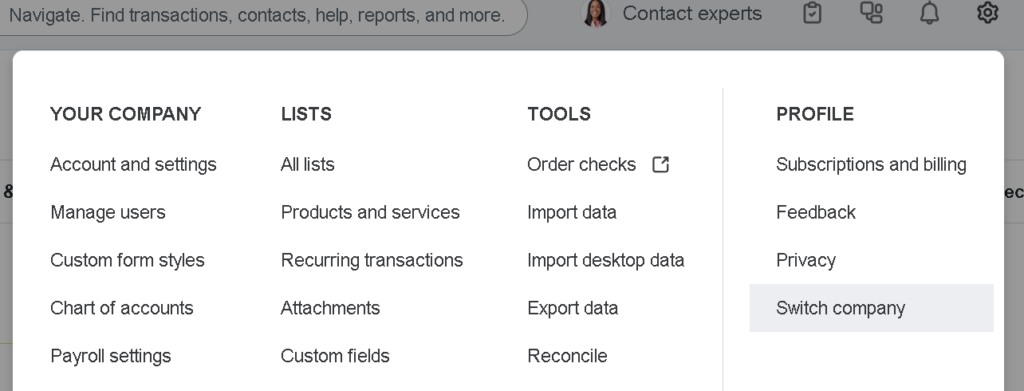
My other tip: to switch between your old and new company accounts – QuickBooks suggests you name the new one something like “Organization Name NEW,” and you can change the old one to “Organization Name OLD” – click the settings gear in the right corner and look for the “Switch company” option, which will be near the bottom right corner of the dropdown menu:
Also, put down in your calendar when to renew your annual subscription by paying TechSoup’s administrative fee again. TechSoup will also send you reminders, but I don’t think you can ever have too many, considering the stakes.
In summary: The offer – a year of QuickBooks for nothing but the administrative fee – is very good and can make a difference to your nonprofit’s budget. But it can take an unexpected amount of work if you already have a QuickBooks subscription. Plan for that ahead of time. Schedule the work for when it willl be least disruptive. Pay attention to the directions you are given, and be ready to reach out to Customer Service if you encounter a problem or get confused. (In this process, Google searching for solutions on Intuit’s website or other forums often failed me – one reason I’m making this post, in hopes that your future search is more productive!)